GIRO.

Your money keeps turning.
Do you know where it stops?

Connect your ERP and see, in minutes, where your cash is stuck, leaking or lost — no data entry, no spreadsheets.

See how it works
01

Your ERP keeps the data.
Not the decision.

Your ERP knows everything. But “everything” isn’t management — it’s bookkeeping. GIRO reads what’s already there and turns it into 23 decision views, ready to use: idle inventory, stockouts, real margin, ABC analysis, suppliers, sales reps, month-end close. You stop digging through reports to find a decision.

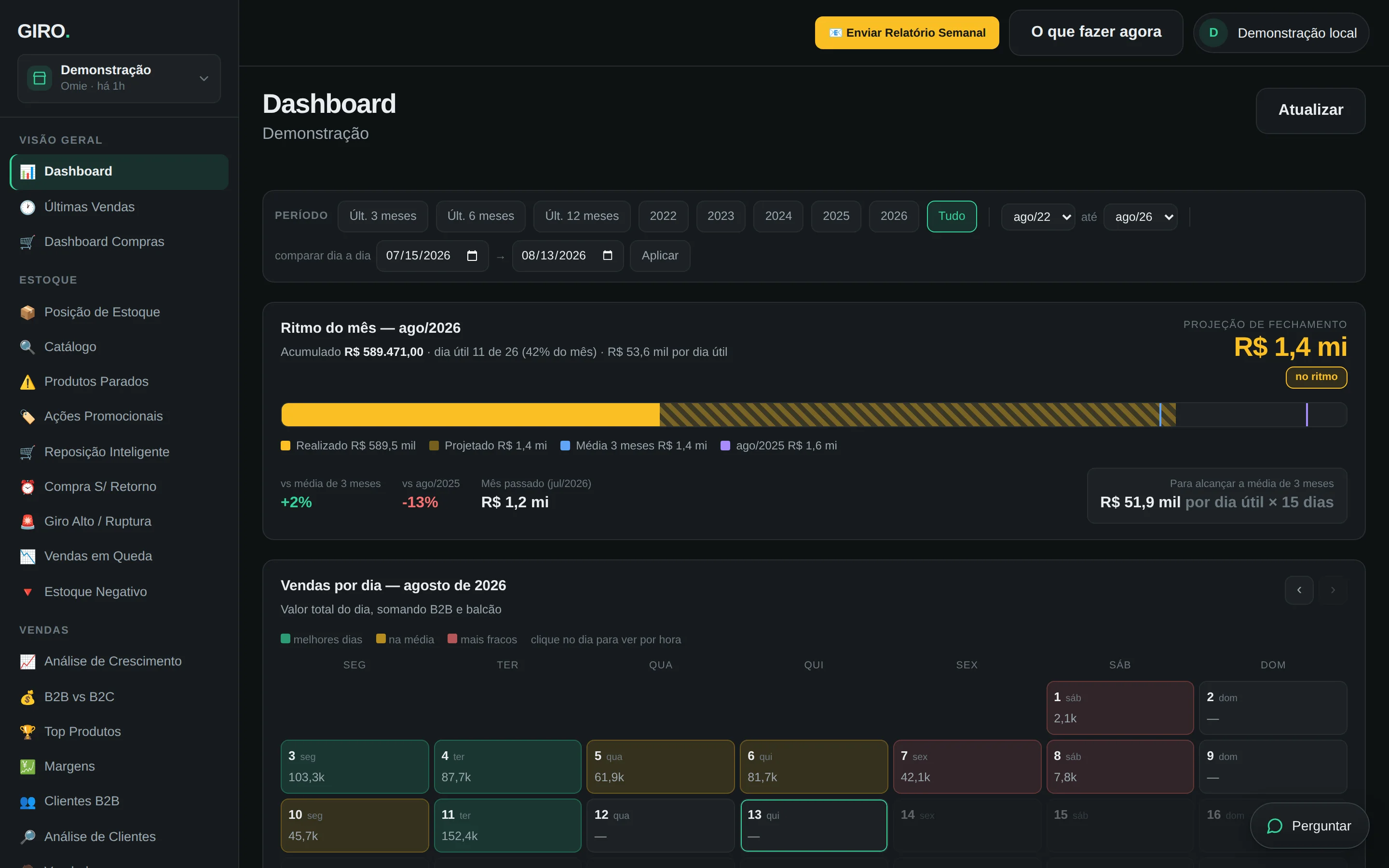
GIRO dashboard showing the month’s pace, the month-end projection and day-by-day sales

Every screen on this page is GIRO running on the demo store — a masked dataset with the shape of a real operation and none of our customers’ data. The product interface is in Portuguese, the language of its launch market.

Security

It only reads.
By design.

No GIRO integration writes so much as a single record to your ERP. That’s not a promise on a page — it’s enforced in code: the connector refuses any write operation before the request leaves our network, and an automated test deliberately tries to write anyway and fails unless it’s refused.

Your API key lives in a vault, never in our database. Each company is isolated from every other by the database itself. The people you invite see what you allow — and nobody can change anything.

Read-only, enforcedNo write operation is on the list of allowed calls. Any change request is refused at the connector.
Credentials in a vaultYour ERP key goes to a secrets vault, not to our database. Disconnecting deletes it for real.
No company can reach anotherIsolation is enforced by the database, row by row — not by an “if” in the application code.
02

Every product sitting
on the shelf is your
cash, asleep.

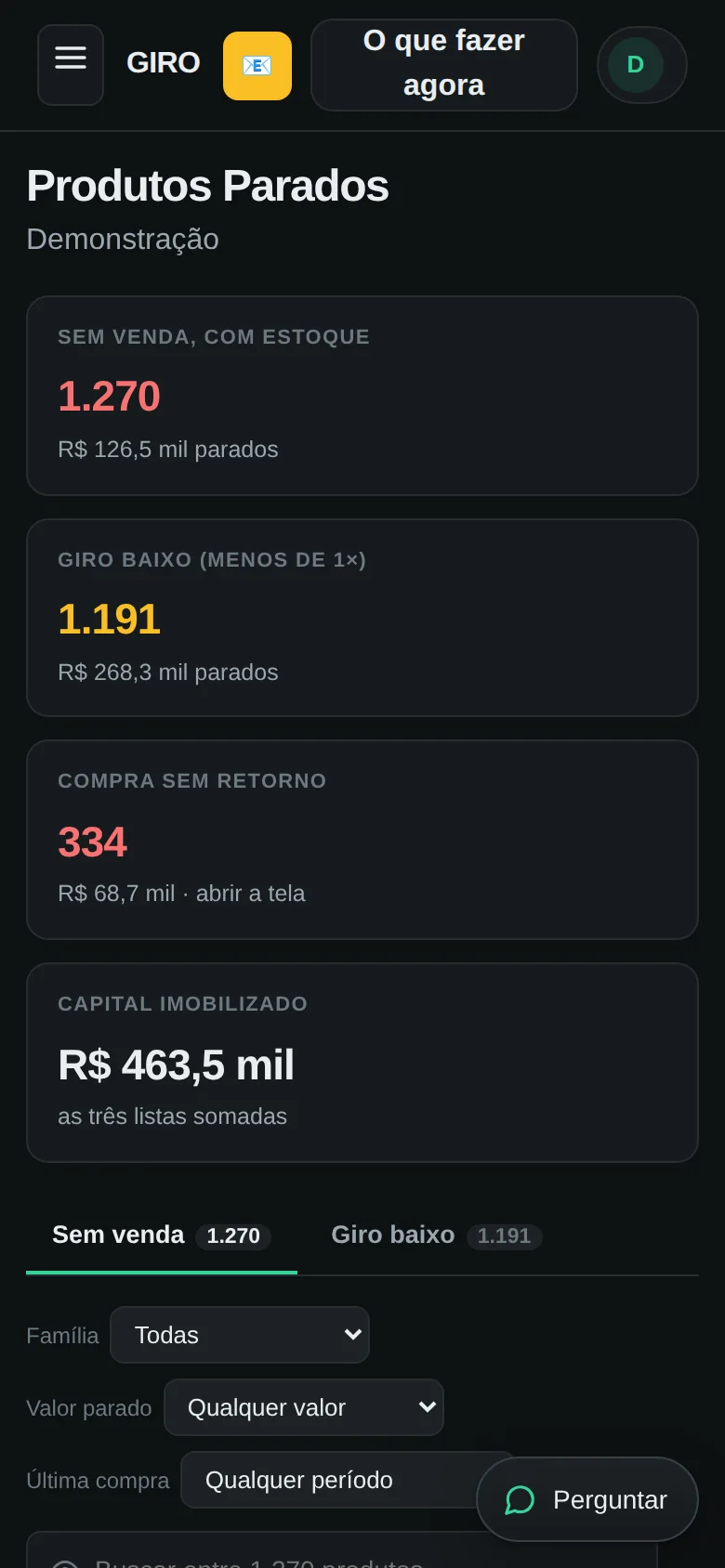
GIRO separates what’s truly stuck from what’s just slow-moving, and puts a number on it: how much of your capital is tied up, in which products, and how long since they last sold. Not a list of SKUs — your cash stuck in inventory, with a name and a date.

Idle-inventory indicators: 1,270 products with no sales, 1,191 slow movers, 334 purchases that never sold and R$463.5k of tied-up capital

Every number opens the list behind it, filterable by product family, value and last purchase date — and exports to Excel.

03

A stockout isn’t
“out of stock.”
It’s a sale that already walked away.

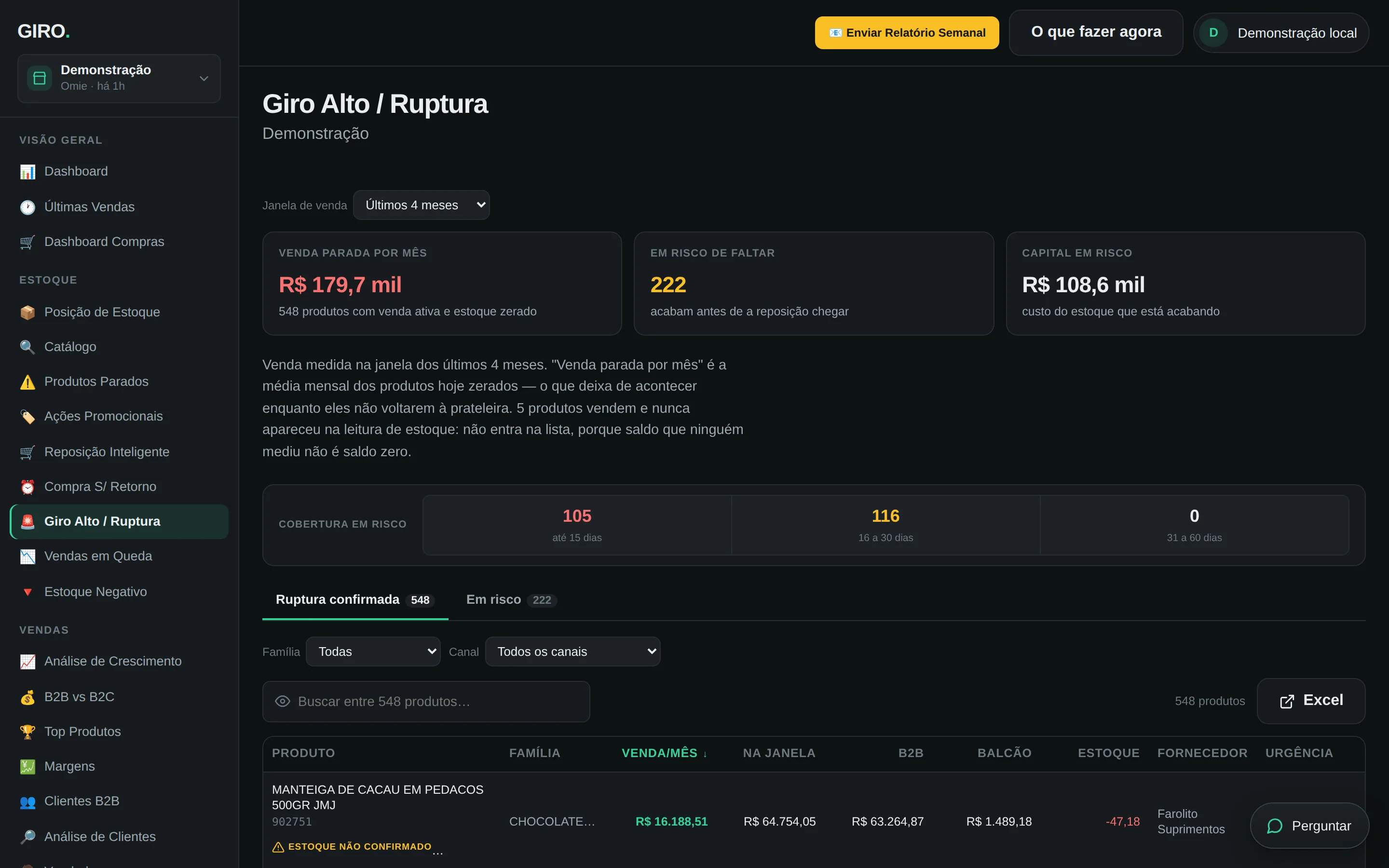
GIRO checks each item’s sales history against its stock position and shows how much was left on the table, item by item — what was selling well and ran out, what will run out before the next delivery arrives, and what that costs you every month.

Fast movers and stockouts screen: R$179.7k of lost sales per month, 222 products at risk of running out and R$108.6k of capital at risk

When GIRO hasn’t measured something yet, it says so — it never makes up a zero. Note the “stock not confirmed” warning on the first row: a balance nobody measured isn’t a zero balance, so that product stays out of the math instead of counting as a shortage.

One store, read end to end

How much it reads
on its own.

The numbers below come from one full read of the demo store — catalog, sales, purchases, inventory and prices, with nobody typing a thing.

15,669 products read from the ERP, with cost, price and stock position.
148k sales lines organized by product, customer, sales rep and channel.
23 decision views, ready to use, all with search, filters and export.
04

Replenishing without a plan
is buying in the dark.

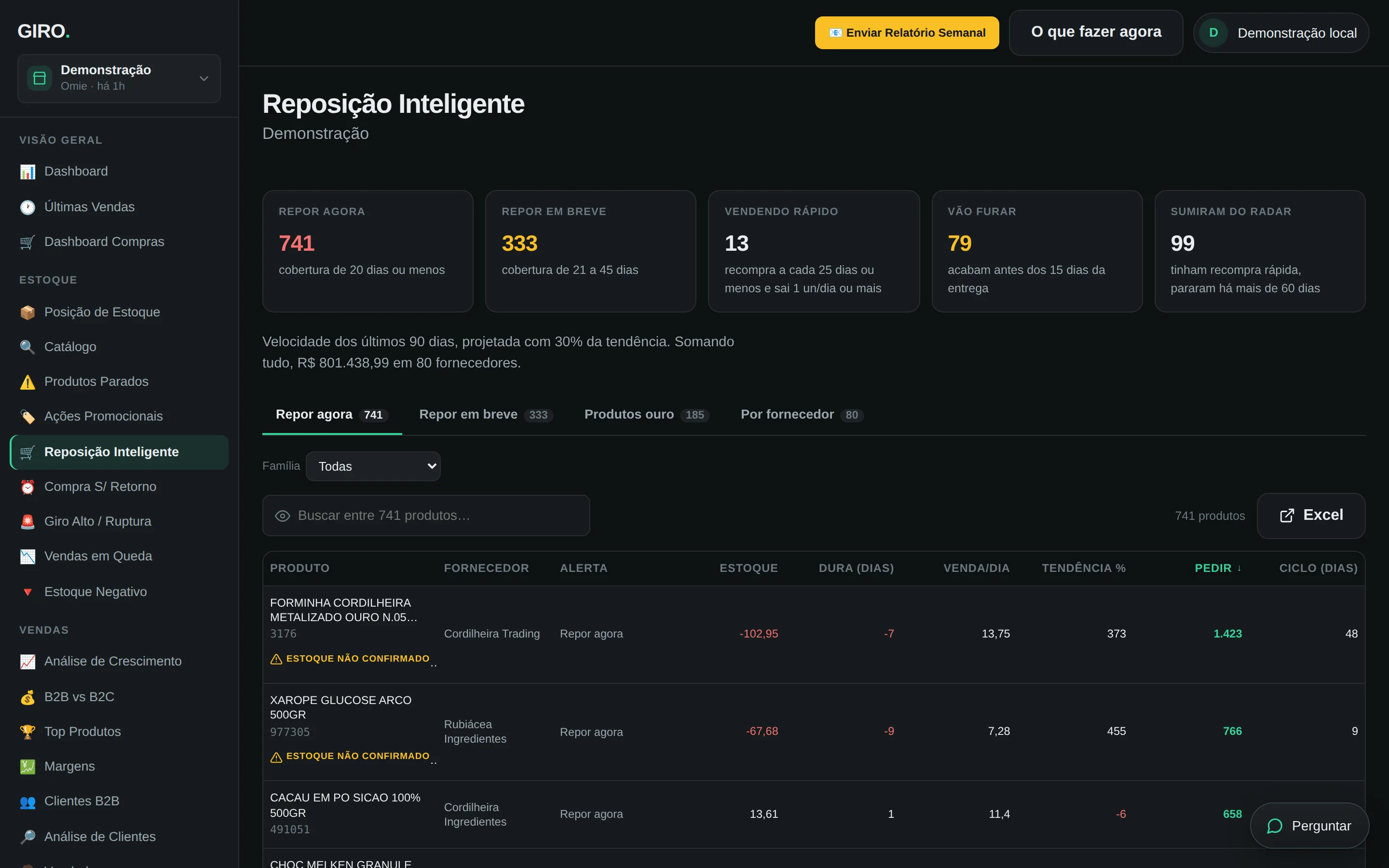
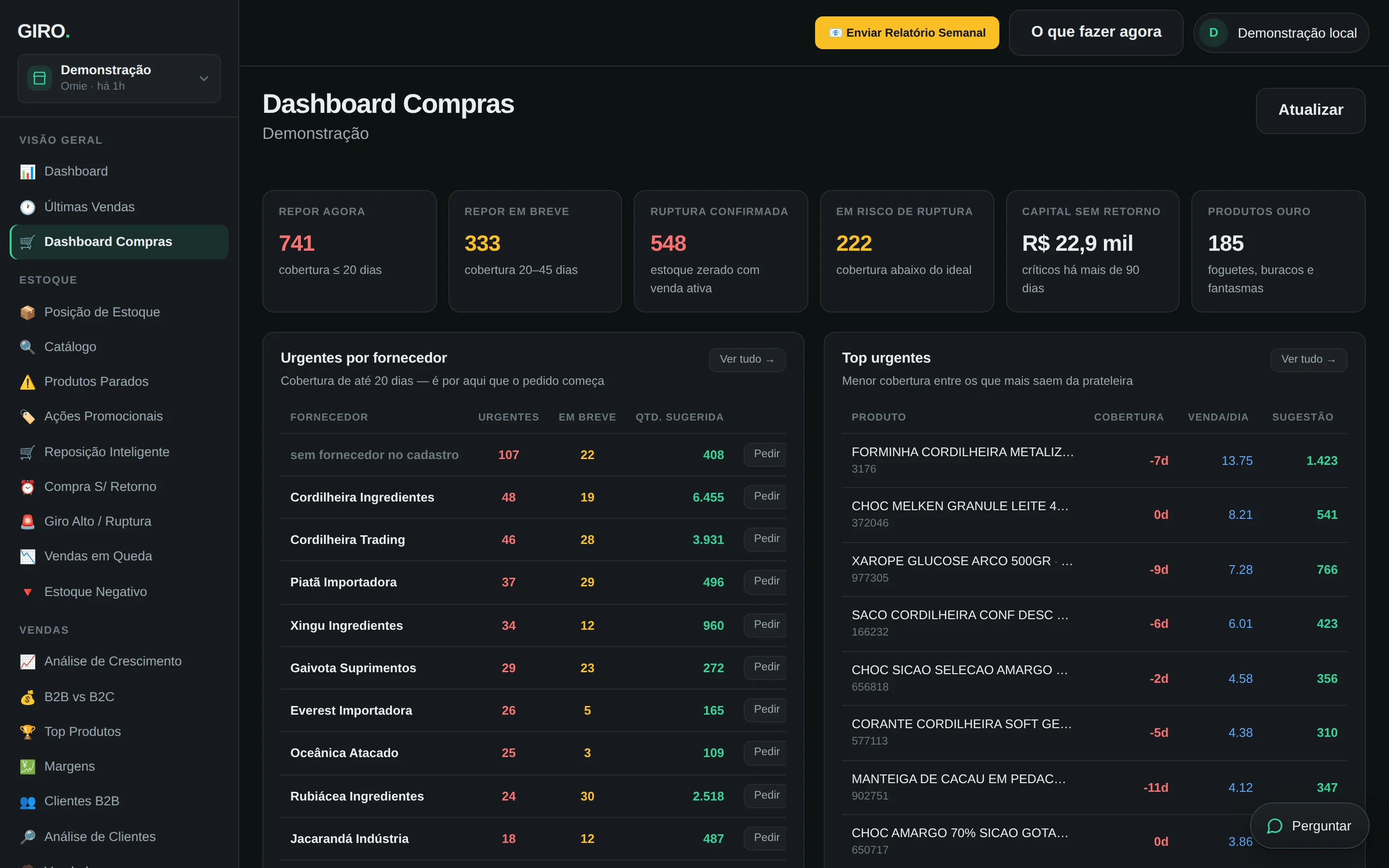
How much to order of each item, from which supplier and how urgently — replenishment calculated from 90-day sales velocity and that supplier’s actual lead time. Ready to export to Excel and bring into the negotiation.

Smart replenishment screen: 741 items to reorder now and 333 soon, with how much to order from each supplier

The “by supplier” tab gathers each supplier’s full order into a single list — it’s the screen where the purchasing conversation happens.

05

High revenue
isn’t the same thing
as profit.

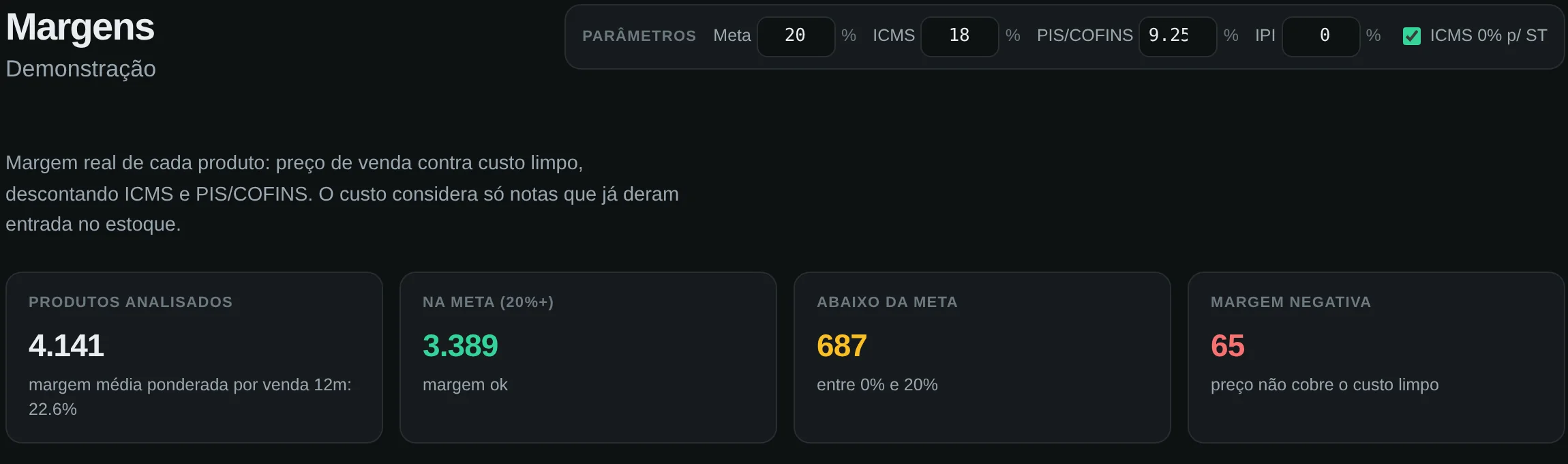
The margin on the invoice is optimistic: it doesn’t deduct taxes, fees or the real cost of the latest purchase. GIRO calculates your real margin after taxes, product by product — and shows how many items you’re selling below cost without knowing it.

Margins screen with Brazilian sales-tax parameters (ICMS, PIS/COFINS) and the summary: 4,141 products analyzed, 687 below target, 65 with negative margin

Tax rates sit at the top of the screen, editable: you set your company’s tax regime, and the math updates instantly.

06

Purchasing: walk in with
numbers, not hunches.

Cost invoice by invoice, what you’ve paid for each item over time, and how much of your purchasing depends on a single supplier. On one screen — the one you open before asking for a discount.

GIRO purchasing dashboard with incoming costs and supplier concentration
07

Month-end close
shouldn’t be a surprise.

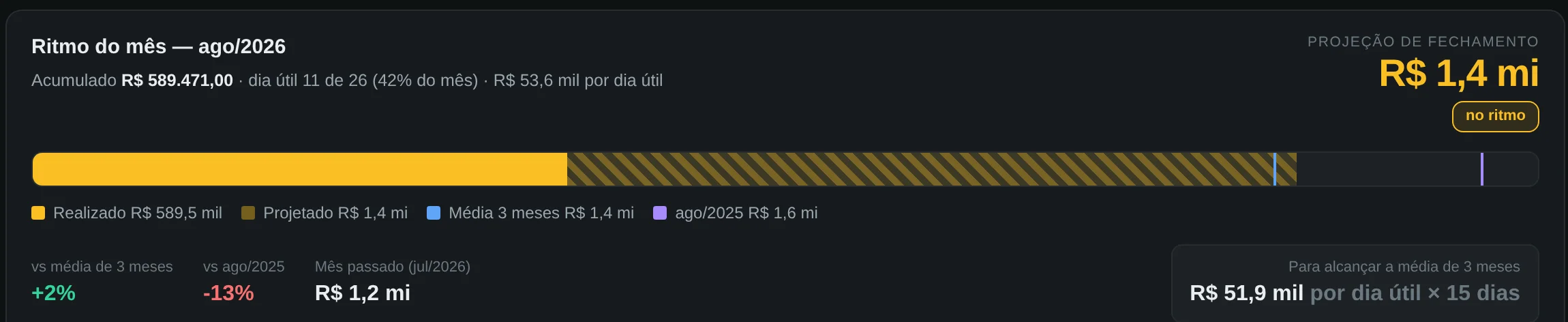
While the month is still running, GIRO projects where it will close at today’s pace, compares it with the average of recent months and with the same month last year, and tells you how much you need per business day to turn it around. Time to act, not a post-mortem.

Month pace: month-to-date sales, a closing projection of R$1.4 million and how much is needed per business day to reach the average

The projection counts business days, not calendar days — a month with a holiday in the middle fools anyone who divides by thirty.

In your pocket

Your business doesn’t stay
at your desk.
Neither does GIRO.

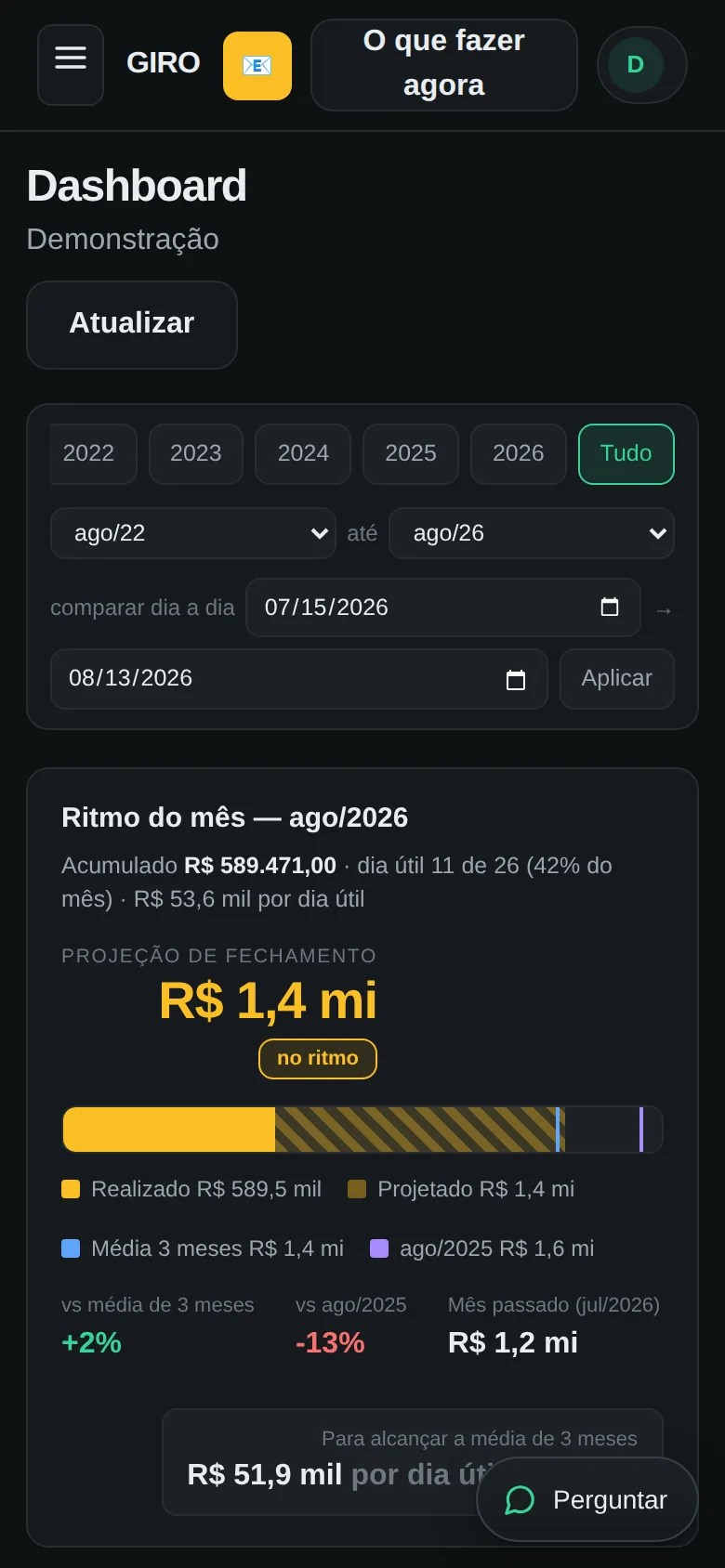
The same read, the same numbers, on your phone — in the stockroom aisle, across the table from a supplier, on a Saturday morning. Nothing to install: it opens in the browser and, if you want, lives on your home screen like an app.

Full screens, not a summary Runs in the browser
08

An AI that answers questions
about your data — and has no
power to touch it.

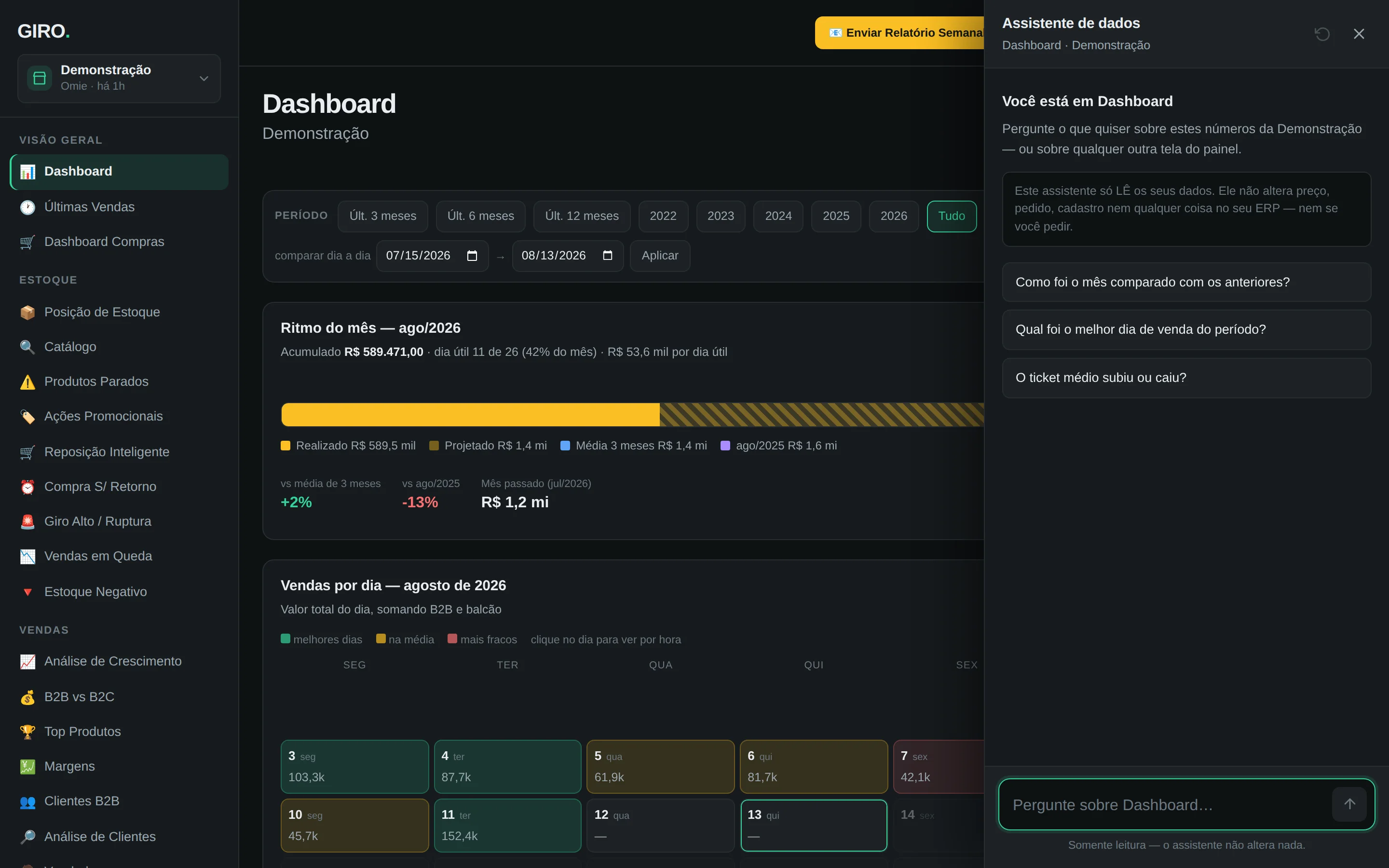
Ask in plain language, the way you’d ask your accountant: how the month went, which customer went quiet, why the margin dropped. The answer comes back right away, grounded in the same screens you just saw. And it only reads — by design, not by promise: the assistant was never given a tool that can change anything, in the ERP or in GIRO.

Data assistant open over the dashboard, stating that it only reads the data and suggesting questions about the month

The notice at the top of the conversation comes from the product itself, not from this page: a request to change something gets an honest refusal.

Before you ask

Can GIRO change anything in my ERP?

No. The connector has a closed list of allowed operations, and none of them writes. The refusal happens before the request leaves our network, and an automated test deliberately attempts thirteen write operations and fails unless every one of them is refused. Even if the key you give us has write permission, we don’t use it.

Which ERPs work today?

Omie, one of Brazil’s leading cloud ERPs, works end to end. The connector layer is modular and the next ones plug in the same way — every new connector ships with the same read-only barrier in front of every endpoint. If your ERP isn’t on the list yet, talk to us: demand decides what comes next.

How long until I see something?

You connect with your ERP’s integration credentials and the first read starts on its own. Views that depend only on sales come in first; the ones that depend on inventory wait for the inventory step to finish — and until then they tell you they’re still measuring, instead of showing zero.

Where does my data live?

In our own database, with companies isolated from each other by the database itself, row by row. Your ERP credential isn’t stored there: it goes to a secrets vault with policy-restricted access. Disconnecting deletes the credential for real — it doesn’t just mark it inactive.

What if GIRO’s numbers don’t match my ERP’s?

Talk to us and we’ll check the math with you. This product was built by reconciling item by item against the dashboard a real operation already used — and along the way it found three wrong calculations in that dashboard, which were fixed here instead of copied. A mismatch is a technical question, not an embarrassment.

Governance isn’t a pretty spreadsheet.
It’s knowing, every day, where
your company’s cash is going.

More than one company? One view with all of them. And share it with partners and managers — no more spreadsheets bouncing around group chats.